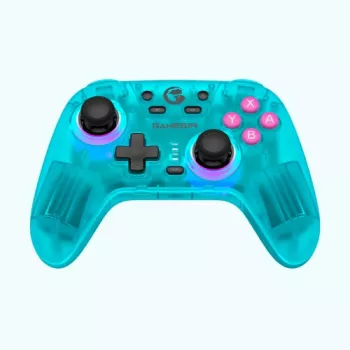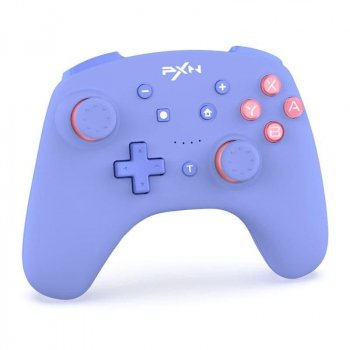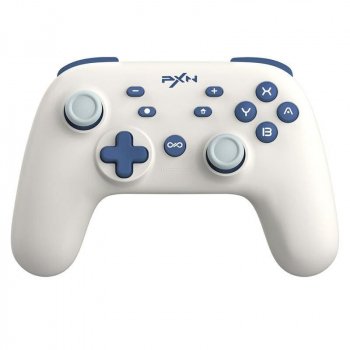

How to Maximize Your Gaming Experience with a Wireless Bluetooth Gamepad Controller
How to Maximize Your Gaming Experience with a Wireless Bluetooth Gamepad Controller
In the ever-evolving world of gaming, comfort and convenience are key. If you’re a Nintendo Switch enthusiast, you’ve likely considered upgrading your gaming gear to enhance your experience. One of the most popular options is the Wireless Bluetooth Gamepad Controller. In this blog post, we’ll explore how to get the most out of your gaming sessions with this versatile accessory. Whether you’re a seasoned gamer or a casual player, these tips will help you level up your gaming experience.
Table of Contents
1. Understanding the Advantages of a Wireless Switch Controller
2. Choosing the Right Bluetooth Gamepad
3. Setting Up Your Bluetooth Gamepad
4. Optimizing Your Gameplay Settings
5. Maintenance Tips for Longevity
6. Conclusion
7. FAQs
Understanding the Advantages of a Wireless Gamepad Controller
Switching to a wireless controller can be a game-changer—literally! Here are some of the key benefits:
1. Freedom of Movement 🎮
Gone are the days of being tethered to your console. With a wireless gamepad, you can play from the comfort of your couch, bed, or even while doing a little victory dance. This freedom allows for a more immersive experience, as you’re not restricted by cable length.
2. Versatility and Convenience 🤖
A Bluetooth gamepad isn’t just for your Switch. Many models are compatible with other devices like PCs, smartphones, and tablets. This versatility means you can enjoy your favorite games across multiple platforms without needing multiple controllers.
3. Enhanced Gameplay 🌟
Modern wireless controllers often come with advanced features like motion controls, customizable buttons, and vibration feedback. These features can enhance your gameplay, making it more responsive and engaging.
Choosing the Right Bluetooth Gamepad
Not all gamepads are created equal. Here’s how to choose the right one for your needs:
1. Comfort and Ergonomics 🖐️
Look for a controller that fits comfortably in your hands. Consider the size, weight, and button layout. Ergonomics are crucial for long gaming sessions, as a poorly designed controller can lead to discomfort or even injury.
2. Battery Life 🔋
Check the battery life of the gamepad. Longer battery life means fewer interruptions during your gaming marathons. Some controllers offer up to 40 hours of playtime on a single charge.
3. Compatibility and Features 🌐
Ensure the gamepad is compatible with your Switch and any other devices you plan to use it with. Explore additional features like turbo mode, macro buttons, or motion controls, which can add depth to your gaming experience.
Setting Up Your Bluetooth Gamepad
So, you’ve got your new gamepad—now what? Here’s how to set it up:
1. Pairing with Your Switch 🔗
Turn on your Switch and navigate to the ‘Controllers’ section. Select ‘Change Grip/Order,’ then hold the pairing button on your gamepad. Once detected, it should appear on your screen. Select it to complete the pairing process.
2. Customizing Button Layout 🔄
Many gamepads allow you to customize your button layout. This feature lets you tailor the controller to your gaming style, ensuring maximum efficiency and comfort.
3. Firmware Updates 🔧
Regularly check for firmware updates from the manufacturer. These updates can enhance performance and fix any bugs, ensuring your controller runs smoothly.
Optimizing Your Gameplay Settings
Now that you’re all set up, let’s fine-tune your settings:
1. Adjust Sensitivity 🎯
Experiment with sensitivity settings to find what feels right for you. Adjusting the joystick sensitivity can greatly impact your precision and control, especially in fast-paced games.
2. Enable Motion Controls 🎥
If your gamepad supports motion controls, give them a try. They can offer a more immersive experience, especially in games designed to utilize this feature.
3. Use Vibration Feedback 🔊
Vibration feedback can enhance your gaming experience by adding a tactile layer of interaction. Enable it to feel every hit, crash, or explosion in-game.
Maintenance Tips for Longevity
To ensure your controller lasts, follow these maintenance tips:
1. Regular Cleaning 🧼
Keep your gamepad clean by gently wiping it with a microfiber cloth. Avoid using harsh chemicals, as they can damage the surface. Clean around buttons and the joystick to prevent build-up that can affect performance.
2. Proper Storage 🗄️
Store your controller in a cool, dry place. Avoid leaving it in direct sunlight or near heat sources, as this can damage the internal components.
3. Battery Care ⚡
To prolong battery life, avoid letting it fully discharge before recharging. Instead, charge it when you get a low battery warning. This practice can extend the overall lifespan of the battery.
Conclusion
Investing in a Wireless Bluetooth Gamepad Controller can significantly enhance your gaming experience. By choosing the right gamepad, setting it up correctly, and optimizing your settings, you can enjoy a more immersive and enjoyable gaming journey. Don’t forget to maintain your controller to ensure it serves you well for years to come. Happy gaming! 🎮
FAQs
Q: Can I use a wireless gamepad with devices other than the Nintendo Switch?
A: Yes, many Bluetooth gamepads are compatible with PCs, smartphones, and tablets. Always check the compatibility list provided by the manufacturer.
Q: How can I extend the battery life of my wireless controller?
A: To extend battery life, avoid letting the battery fully discharge before recharging. Regularly update the firmware to ensure optimal power management.
Q: Are all wireless gamepads equipped with motion controls?
A: Not all gamepads have motion controls. If this feature is important to you, check the specifications before purchasing.
Q: How do I clean my gamepad without damaging it?
A: Use a microfiber cloth to gently wipe the surface. Avoid harsh chemicals and ensure buttons and joysticks are free of dust and debris.